If your business never trades outside the United States, there is no reason to accept email from anywhere else. Proofpoint Essentials can quarantine email by country in about two minutes. Here is exactly how.
Most phishing and spam aimed at small businesses arrives from outside the country the business actually operates in. If you only ever deal with US customers and US suppliers, a message from a sending server in another country is almost never something you were waiting for.
Proofpoint Essentials has a filter condition for exactly this. One inbound rule, set once at company level, and anything arriving from outside the US goes to quarantine instead of the inbox.
What the Rule Does
Proofpoint reads the country of the sending server’s IP address, not the country in the email address. The rule says: if the sending server is not in the United States, quarantine the message.
Quarantine is not deletion. The message is held, it still appears on the user’s quarantine digest, and anything caught by mistake can be released.
Setting It Up
- Go to Security Settings > Email > Filter Policies and create a new filter with direction Inbound. Give it a name you will recognise later, such as Geo IP Block.
- Set the Scope to company level so it covers every mailbox.
- For the condition, choose Client IP Country, set the operator to IS NOT, and select United States. Add any other countries you legitimately do business with to the same list.
- For the action, choose Quarantine.
- Click Save.
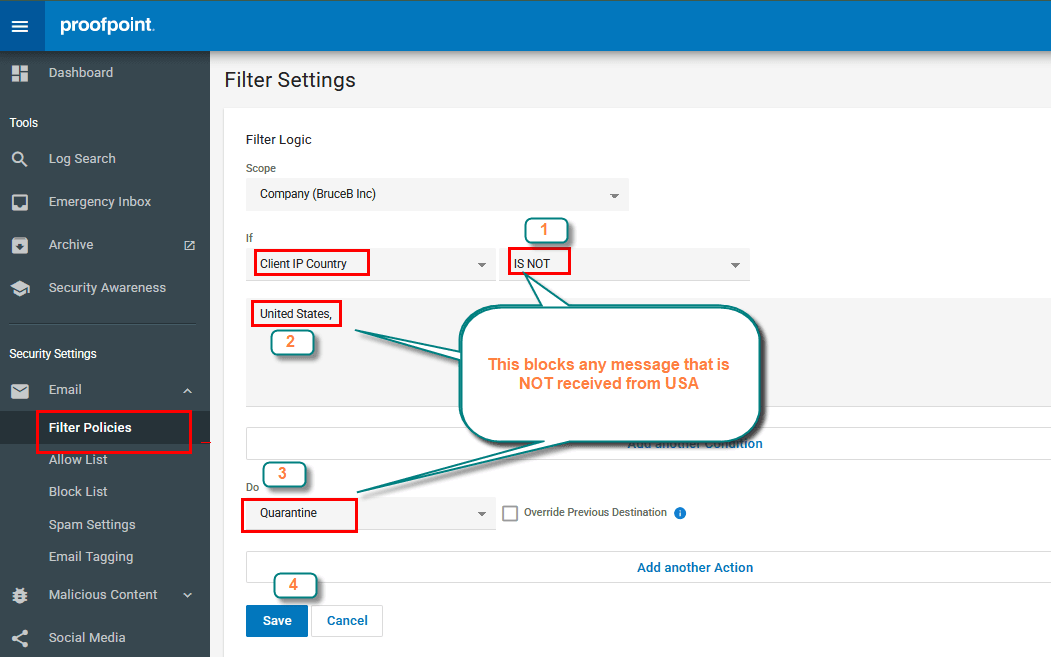
That is the whole rule. It takes effect on the next message that arrives.
Proofpoint also offers Require Admin Privileges to Release, which stops users releasing these messages themselves, and Stop Processing Additional Filters, which ends filter evaluation here. Both are genuinely optional. Leave them off unless you have a reason.
Before You Turn It On
- Think about who actually emails you. An overseas supplier, a customer travelling abroad, or a software vendor’s notification emails will all be caught. Add those countries to the list, or be ready to release the odd message.
- Cloud services are the usual surprise. Plenty of legitimate senders route mail through datacentres abroad, so the sending server’s country is not always the company’s country.
- Location data is not perfect. Proofpoint points this out themselves: a WHOIS registration is not the same thing as where an IP address physically sits, and large providers often register everything to one head office.
- Check the digest for a week. Nothing is lost while you watch what lands in quarantine, and it tells you quickly whether your country list needs another entry.
Is This Worth Doing?
For a US-only business, yes. It is one rule, it costs nothing, it runs before your users ever see the message, and it removes a large slice of inbound junk that would otherwise have to be judged on its content.
It is not a replacement for the rest of your email security. It is one cheap, blunt filter that happens to line up very well with how a lot of small businesses actually operate.
Frequently Asked Questions
Does this delete the blocked email?+
No. It quarantines it. The message is held rather than delivered, it still shows up on the user’s quarantine digest, and it can be released if it turns out to be legitimate. Nothing is thrown away.
Does it affect email we send out?+
No. The filter is created with direction Inbound, so it only looks at mail arriving for your users. Your outbound mail to customers or suppliers anywhere in the world is untouched.
What if we do business with one or two other countries?+
Add them to the same condition. The IS NOT list takes multiple countries, so you can allow the United States plus Canada plus anywhere else you genuinely trade with, and quarantine the rest. One rule still covers it.
Does it go by the sender’s email address or their location?+
Neither, exactly. It goes by the country of the server that handed the message to Proofpoint. A .com address means nothing here, and so does a signature claiming a US office. That is the point: the address is trivial to fake, the sending server is harder to disguise.
Want This Set Up For You?
Twilight I.T. manages Proofpoint Essentials for our clients, including the filter rules, the quarantine digests and the release requests when something legitimate gets caught.